| Tue 03.06.2025 | Malloc-is-free |
Malloc is now freeMalloc, my beloved cat passed away this morning aged 17.5 years at 4am BST on the 3rd of June 2025. He passed away peacefully in his sleep while at the vet being treated. I saw him one last time yesterday afternoon before hoping a new day may bring better results. He was coming out of being put under in preparation for surgery for a broken leg and I think he recognized me as he responded to his name and tried so hard to move just a bit in my direction. The operation could not go ahead. His kidneys were in failure. His heart was failing with it being enlarged to double the normal size.
I hope he had a good life. Nothing prepares you for this. It hurts. So much. Malloc is now free(). 


| |
| Fri 04.01.2019 | Mesa assembly bug on Respberry Pi VC4 with fix |
Mesa assembly bug on Raspberry Pi / VC4 with fixAfter a few days of banging my head against this and chasing a red herring in gdb and with some help from HdkR I found the problem. Mesa’s VC4 code that uploads (and downloads) texture tiles has incorrect ARM assembly in it. It forgot that some of the input parameters to be held in registers are actually modified by the ASM and declared them as "r" instead of "+r". It seemed a simple enough fix, but unfortunately there were a series of issues that made it more complex. So first some "r" arguments had to become "+r", but this isn't allowed to just be done with small changes because the compiler requires "+r" arguments to be moved into the OUTPUT section (the top line of arguments starting with : that was empty before) which means positional arguments all change around (The “+r” means the register argument is modified in the assembly, as opposed to "r" meaning it is input only and not modified). Of course manually renaming a bunch of numbers to match a new order is just asking for trouble going and converting %0 to %2 and %2 to %1 and so on, so it's a pretty unsafe way to do it. The better way is to now NAME the arguments. This is done by adding a [name_here] in front of each argument in the output/input lists at the end. This means instead of referring to the argument positionally like %0 and %2 etc. you can now refer to it by name like %[name_here]. This was the first thing I did. so as to not make mistakes later. Even if this is all I did, I’d still have a crashing, not working set of code that can’t be tested. This unfortunately leads to another problem. One of the original input arguments was a value of cpu + 8. The compiler does not allow this when you name arguments. It has to be a plain variable and not an expression once you use names. So I quickly tried using a temporary variable in C above the assembly block like: unsigned char *cpu2 = cpu + 8; (A side mention: The cpu pointer coming in is a void * pointer and doing any math like the original code did is not a great idea as size is not clearly defined). This just temporary C variable led to the compiler somehow filling cpu2 with junk when it was inside the assembly and not the address of cpu + 8. Chalk this one up to some compiler bug or desire to just do whatever it wanted if you were doing void pointer math. So there was no way to have a working patch in this form because it'd just crash as the 2nd address (cpu2) is wrong. Thus I also had to roll in an add by hand in the assembly block with a temporary register of r0 or w0 on aarch64 to ensure it was correct and actually worked (in theory), but in this case if I hadn't changed the "r" to "+r" it’d still crash for the same original reasons at the top. So this really necessitates a single patch for both safety/sanity of the change and having it actually compile and run as a unit. If I did just the name change first stand-alone, it can't compile thanks to the cpu + 8 and thus it can't pass test suites or be useful. If I just put in a line of C outside and convert cpu + 8 to cpu2 as above, then it generates incorrect code (the values I saw in gdb for that register were total junk and nothing like the cpu address). This also would be a bit more change in 1 patch but wouldn't run or pass any test suites. I could add the inline assembly to do the add as I did and make this a single patch, But at least for me this would still crash and would not be testable as thing would still fail and crash, so it's be an untested patch, thus it really needed to also merge in the changes to "r" to become "+r" in some cases to actually be a compile-able and testable unit on its own. Sometimes life gives you lemons, so you have to make lemonade. What to learn?What can we learn from this? Firstly, when doing your inline assembly, first it's always easier to read, maintain and modify if you use named, rather than positional arguments. If you have to move arguments around (they go from input to output or something) you don't have to do a risky re-do of all the positional arguments. It'll make your days saner reading the code anyway. Secondly, be careful about how to tag your arguments. Are they modified in the assembly block? Read the manuals carefully for your instructions to be sure. The bug may appear years later, long after you or someone else wrote that code, and a more aggressively optimizing compiler might just now break it. Read your docs on inline assembly and these notations and get them right. Also don't forget to put any registers you use by hand inside in the clobbered list (last set of values at the end. This was correct already but any new registers you use, add them to this, or if you stop using them remove them from here). Also just as a note - don't do math on pointers that are not clearly sized, so don't do void *ptr1 = x; void *ptr2 = ptr1 + 8;. Use a char * at least if you're doing your address math byte by byte. The patchIf anyone is having problems with a fairly freshly compiled mesa with a fresh compiler then you might want to try the below patch to fix it. I've sent this off to Eric Anholt so it'll hopefully go into Mesa some time soon.
From fa297372cec1f964f7946d7de55c28920052ab8b Mon Sep 17 00:00:00 2001
From: Carsten Haitzler
Date: Wed, 2 Jan 2019 18:56:23 +0000
Subject: [PATCH 10/10] vc4: Fix NEON and aarch64 ASM for up/download of textures
The neon ASM didn't properly declare variables that go into
registers that are being modified in the ASM thus confusing
the compiler and generating bad code and segfaults on
texture upload at least. This fixes that and properly
declares registers with a "+" for input and output.
It also has to move these to another section (they must be
in the output section, rather than input). It also uses a
more readable naming of the variables that go into registers
so the code is easier to follow and maintain (had to do
this just as part of fixing it to make it sane to debug
and modify/fix).
This seems to have happened as a result of a new compiler
(gcc 8.2) at least and generates the bad code because
the inline functions are being inlined in a way where
registers that contain pointers are being re-used
since they were not declared to have changed. I noticed
that compiling mesa with -O0 made the problem go away
(turned off inlining thus the above issue). -O1 and
above and it happened.
I only tested this on 32bit ARM. The same problem existed
in theory for aarch64 but I didn't see the issue there. I
fixed the aarch64 ASM too.
---
src/broadcom/common/v3d_cpu_tiling.h | 200 +++++++++++++++------------
1 file changed, 108 insertions(+), 92 deletions(-)
diff --git a/src/broadcom/common/v3d_cpu_tiling.h b/src/broadcom/common/v3d_cpu_tiling.h
index 82ac2aef6a..ac3d0135b8 100644
--- a/src/broadcom/common/v3d_cpu_tiling.h
+++ b/src/broadcom/common/v3d_cpu_tiling.h
@@ -37,20 +37,22 @@ v3d_load_utile(void *cpu, uint32_t cpu_stride,
/* Load from the GPU in one shot, no interleave, to
* d0-d7.
*/
- "vldm %0, {q0, q1, q2, q3}\n"
+ ".fpu neon\n"
+ "vldm %[gpu], {q0, q1, q2, q3}\n"
/* Store each 8-byte line to cpu-side destination,
* incrementing it by the stride each time.
*/
- "vst1.8 d0, [%1], %2\n"
- "vst1.8 d1, [%1], %2\n"
- "vst1.8 d2, [%1], %2\n"
- "vst1.8 d3, [%1], %2\n"
- "vst1.8 d4, [%1], %2\n"
- "vst1.8 d5, [%1], %2\n"
- "vst1.8 d6, [%1], %2\n"
- "vst1.8 d7, [%1]\n"
- :
- : "r"(gpu), "r"(cpu), "r"(cpu_stride)
+ "vst1.8 d0, [%[cpu]], %[cpu_stride]\n"
+ "vst1.8 d1, [%[cpu]], %[cpu_stride]\n"
+ "vst1.8 d2, [%[cpu]], %[cpu_stride]\n"
+ "vst1.8 d3, [%[cpu]], %[cpu_stride]\n"
+ "vst1.8 d4, [%[cpu]], %[cpu_stride]\n"
+ "vst1.8 d5, [%[cpu]], %[cpu_stride]\n"
+ "vst1.8 d6, [%[cpu]], %[cpu_stride]\n"
+ "vst1.8 d7, [%[cpu]]\n"
+ : [cpu] "+r"(cpu)
+ : [gpu] "r"(gpu),
+ [cpu_stride] "r"(cpu_stride)
: "q0", "q1", "q2", "q3");
return;
} else if (gpu_stride == 16) {
@@ -58,22 +60,25 @@ v3d_load_utile(void *cpu, uint32_t cpu_stride,
/* Load from the GPU in one shot, no interleave, to
* d0-d7.
*/
- "vldm %0, {q0, q1, q2, q3};\n"
+ ".fpu neon\n"
+ "add r0, %[cpu], #8\n" /* Work around compiler bug */
+ "vldm %[gpu], {q0, q1, q2, q3};\n"
/* Store each 16-byte line in 2 parts to the cpu-side
* destination. (vld1 can only store one d-register
* at a time).
*/
- "vst1.8 d0, [%1], %3\n"
- "vst1.8 d1, [%2], %3\n"
- "vst1.8 d2, [%1], %3\n"
- "vst1.8 d3, [%2], %3\n"
- "vst1.8 d4, [%1], %3\n"
- "vst1.8 d5, [%2], %3\n"
- "vst1.8 d6, [%1]\n"
- "vst1.8 d7, [%2]\n"
- :
- : "r"(gpu), "r"(cpu), "r"(cpu + 8), "r"(cpu_stride)
- : "q0", "q1", "q2", "q3");
+ "vst1.8 d0, [%[cpu]], %[cpu_stride]\n"
+ "vst1.8 d1, [r0], %[cpu_stride]\n"
+ "vst1.8 d2, [%[cpu]], %[cpu_stride]\n"
+ "vst1.8 d3, [r0], %[cpu_stride]\n"
+ "vst1.8 d4, [%[cpu]], %[cpu_stride]\n"
+ "vst1.8 d5, [r0], %[cpu_stride]\n"
+ "vst1.8 d6, [%[cpu]]\n"
+ "vst1.8 d7, [r0]\n"
+ : [cpu] "+r"(cpu)
+ : [gpu] "r"(gpu),
+ [cpu_stride] "r"(cpu_stride)
+ : "r0", "q0", "q1", "q2", "q3");
return;
}
#elif defined (PIPE_ARCH_AARCH64)
@@ -82,20 +87,21 @@ v3d_load_utile(void *cpu, uint32_t cpu_stride,
/* Load from the GPU in one shot, no interleave, to
* d0-d7.
*/
- "ld1 {v0.2d, v1.2d, v2.2d, v3.2d}, [%0]\n"
+ "ld1 {v0.2d, v1.2d, v2.2d, v3.2d}, [%[gpu]]\n"
/* Store each 8-byte line to cpu-side destination,
* incrementing it by the stride each time.
*/
- "st1 {v0.D}[0], [%1], %2\n"
- "st1 {v0.D}[1], [%1], %2\n"
- "st1 {v1.D}[0], [%1], %2\n"
- "st1 {v1.D}[1], [%1], %2\n"
- "st1 {v2.D}[0], [%1], %2\n"
- "st1 {v2.D}[1], [%1], %2\n"
- "st1 {v3.D}[0], [%1], %2\n"
- "st1 {v3.D}[1], [%1]\n"
- :
- : "r"(gpu), "r"(cpu), "r"(cpu_stride)
+ "st1 {v0.D}[0], [%[cpu]], %[cpu_stride]\n"
+ "st1 {v0.D}[1], [%[cpu]], %[cpu_stride]\n"
+ "st1 {v1.D}[0], [%[cpu]], %[cpu_stride]\n"
+ "st1 {v1.D}[1], [%[cpu]], %[cpu_stride]\n"
+ "st1 {v2.D}[0], [%[cpu]], %[cpu_stride]\n"
+ "st1 {v2.D}[1], [%[cpu]], %[cpu_stride]\n"
+ "st1 {v3.D}[0], [%[cpu]], %[cpu_stride]\n"
+ "st1 {v3.D}[1], [%[cpu]]\n"
+ : [cpu] "+r"(cpu)
+ : [gpu] "r"(gpu),
+ [cpu_stride] "r"(cpu_stride)
: "v0", "v1", "v2", "v3");
return;
} else if (gpu_stride == 16) {
@@ -103,22 +109,24 @@ v3d_load_utile(void *cpu, uint32_t cpu_stride,
/* Load from the GPU in one shot, no interleave, to
* d0-d7.
*/
- "ld1 {v0.2d, v1.2d, v2.2d, v3.2d}, [%0]\n"
+ "add w0, %[cpu], #8\n" /* Work around compiler bug */
+ "ld1 {v0.2d, v1.2d, v2.2d, v3.2d}, [%[gpu]]\n"
/* Store each 16-byte line in 2 parts to the cpu-side
* destination. (vld1 can only store one d-register
* at a time).
*/
- "st1 {v0.D}[0], [%1], %3\n"
- "st1 {v0.D}[1], [%2], %3\n"
- "st1 {v1.D}[0], [%1], %3\n"
- "st1 {v1.D}[1], [%2], %3\n"
- "st1 {v2.D}[0], [%1], %3\n"
- "st1 {v2.D}[1], [%2], %3\n"
- "st1 {v3.D}[0], [%1]\n"
- "st1 {v3.D}[1], [%2]\n"
- :
- : "r"(gpu), "r"(cpu), "r"(cpu + 8), "r"(cpu_stride)
- : "v0", "v1", "v2", "v3");
+ "st1 {v0.D}[0], [%[cpu]], %[cpu_stride]\n"
+ "st1 {v0.D}[1], [w0], %[cpu_stride]\n"
+ "st1 {v1.D}[0], [%[cpu]], %[cpu_stride]\n"
+ "st1 {v1.D}[1], [w0], %[cpu_stride]\n"
+ "st1 {v2.D}[0], [%[cpu]], %[cpu_stride]\n"
+ "st1 {v2.D}[1], [w0], %[cpu_stride]\n"
+ "st1 {v3.D}[0], [%[cpu]]\n"
+ "st1 {v3.D}[1], [w0]\n"
+ : [cpu] "+r"(cpu)
+ : [gpu] "r"(gpu),
+ [cpu_stride] "r"(cpu_stride)
+ : "w0", "v0", "v1", "v2", "v3");
return;
}
#endif
@@ -139,20 +147,22 @@ v3d_store_utile(void *gpu, uint32_t gpu_stride,
/* Load each 8-byte line from cpu-side source,
* incrementing it by the stride each time.
*/
- "vld1.8 d0, [%1], %2\n"
- "vld1.8 d1, [%1], %2\n"
- "vld1.8 d2, [%1], %2\n"
- "vld1.8 d3, [%1], %2\n"
- "vld1.8 d4, [%1], %2\n"
- "vld1.8 d5, [%1], %2\n"
- "vld1.8 d6, [%1], %2\n"
- "vld1.8 d7, [%1]\n"
+ ".fpu neon\n"
+ "vld1.8 d0, [%[cpu]], %[cpu_stride]\n"
+ "vld1.8 d1, [%[cpu]], %[cpu_stride]\n"
+ "vld1.8 d2, [%[cpu]], %[cpu_stride]\n"
+ "vld1.8 d3, [%[cpu]], %[cpu_stride]\n"
+ "vld1.8 d4, [%[cpu]], %[cpu_stride]\n"
+ "vld1.8 d5, [%[cpu]], %[cpu_stride]\n"
+ "vld1.8 d6, [%[cpu]], %[cpu_stride]\n"
+ "vld1.8 d7, [%[cpu]]\n"
/* Load from the GPU in one shot, no interleave, to
* d0-d7.
*/
- "vstm %0, {q0, q1, q2, q3}\n"
- :
- : "r"(gpu), "r"(cpu), "r"(cpu_stride)
+ "vstm %[gpu], {q0, q1, q2, q3}\n"
+ : [cpu] "+r"(cpu)
+ : [gpu] "r"(gpu),
+ [cpu_stride] "r"(cpu_stride)
: "q0", "q1", "q2", "q3");
return;
} else if (gpu_stride == 16) {
@@ -161,19 +171,22 @@ v3d_store_utile(void *gpu, uint32_t gpu_stride,
* destination. (vld1 can only store one d-register
* at a time).
*/
- "vld1.8 d0, [%1], %3\n"
- "vld1.8 d1, [%2], %3\n"
- "vld1.8 d2, [%1], %3\n"
- "vld1.8 d3, [%2], %3\n"
- "vld1.8 d4, [%1], %3\n"
- "vld1.8 d5, [%2], %3\n"
- "vld1.8 d6, [%1]\n"
- "vld1.8 d7, [%2]\n"
+ ".fpu neon\n"
+ "add r0, %[cpu], #8\n" /* Work around compiler bug */
+ "vld1.8 d0, [%[cpu]], %[cpu_stride]\n"
+ "vld1.8 d1, [r0], %[cpu_stride]\n"
+ "vld1.8 d2, [%[cpu]], %[cpu_stride]\n"
+ "vld1.8 d3, [r0], %[cpu_stride]\n"
+ "vld1.8 d4, [%[cpu]], %[cpu_stride]\n"
+ "vld1.8 d5, [r0], %[cpu_stride]\n"
+ "vld1.8 d6, [%[cpu]]\n"
+ "vld1.8 d7, [r0]\n"
/* Store to the GPU in one shot, no interleave. */
- "vstm %0, {q0, q1, q2, q3}\n"
- :
- : "r"(gpu), "r"(cpu), "r"(cpu + 8), "r"(cpu_stride)
- : "q0", "q1", "q2", "q3");
+ "vstm %[gpu], {q0, q1, q2, q3}\n"
+ : [cpu] "+r"(cpu)
+ : [gpu] "r"(gpu),
+ [cpu_stride] "r"(cpu_stride)
+ : "r0", "q0", "q1", "q2", "q3");
return;
}
#elif defined (PIPE_ARCH_AARCH64)
@@ -182,18 +195,19 @@ v3d_store_utile(void *gpu, uint32_t gpu_stride,
/* Load each 8-byte line from cpu-side source,
* incrementing it by the stride each time.
*/
- "ld1 {v0.D}[0], [%1], %2\n"
- "ld1 {v0.D}[1], [%1], %2\n"
- "ld1 {v1.D}[0], [%1], %2\n"
- "ld1 {v1.D}[1], [%1], %2\n"
- "ld1 {v2.D}[0], [%1], %2\n"
- "ld1 {v2.D}[1], [%1], %2\n"
- "ld1 {v3.D}[0], [%1], %2\n"
- "ld1 {v3.D}[1], [%1]\n"
+ "ld1 {v0.D}[0], [%[cpu]], %[cpu_stride]\n"
+ "ld1 {v0.D}[1], [%[cpu]], %[cpu_stride]\n"
+ "ld1 {v1.D}[0], [%[cpu]], %[cpu_stride]\n"
+ "ld1 {v1.D}[1], [%[cpu]], %[cpu_stride]\n"
+ "ld1 {v2.D}[0], [%[cpu]], %[cpu_stride]\n"
+ "ld1 {v2.D}[1], [%[cpu]], %[cpu_stride]\n"
+ "ld1 {v3.D}[0], [%[cpu]], %[cpu_stride]\n"
+ "ld1 {v3.D}[1], [%[cpu]]\n"
/* Store to the GPU in one shot, no interleave. */
- "st1 {v0.2d, v1.2d, v2.2d, v3.2d}, [%0]\n"
- :
- : "r"(gpu), "r"(cpu), "r"(cpu_stride)
+ "st1 {v0.2d, v1.2d, v2.2d, v3.2d}, [%[gpu]]\n"
+ : [cpu] "+r"(cpu)
+ : [gpu] "r"(gpu),
+ [cpu_stride] "r"(cpu_stride)
: "v0", "v1", "v2", "v3");
return;
} else if (gpu_stride == 16) {
@@ -202,19 +216,21 @@ v3d_store_utile(void *gpu, uint32_t gpu_stride,
* destination. (vld1 can only store one d-register
* at a time).
*/
- "ld1 {v0.D}[0], [%1], %3\n"
- "ld1 {v0.D}[1], [%2], %3\n"
- "ld1 {v1.D}[0], [%1], %3\n"
- "ld1 {v1.D}[1], [%2], %3\n"
- "ld1 {v2.D}[0], [%1], %3\n"
- "ld1 {v2.D}[1], [%2], %3\n"
- "ld1 {v3.D}[0], [%1]\n"
- "ld1 {v3.D}[1], [%2]\n"
+ "add w0, %[cpu], #8\n" /* Work around compiler bug */
+ "ld1 {v0.D}[0], [%[cpu]], %[cpu_stride]\n"
+ "ld1 {v0.D}[1], [w0], %[cpu_stride]\n"
+ "ld1 {v1.D}[0], [%[cpu]], %[cpu_stride]\n"
+ "ld1 {v1.D}[1], [w0], %[cpu_stride]\n"
+ "ld1 {v2.D}[0], [%[cpu]], %[cpu_stride]\n"
+ "ld1 {v2.D}[1], [w0], %[cpu_stride]\n"
+ "ld1 {v3.D}[0], [%[cpu]]\n"
+ "ld1 {v3.D}[1], [w0]\n"
/* Store to the GPU in one shot, no interleave. */
- "st1 {v0.2d, v1.2d, v2.2d, v3.2d}, [%0]\n"
- :
- : "r"(gpu), "r"(cpu), "r"(cpu + 8), "r"(cpu_stride)
- : "v0", "v1", "v2", "v3");
+ "st1 {v0.2d, v1.2d, v2.2d, v3.2d}, [%[gpu]]\n"
+ : [cpu] "+r"(cpu)
+ : [gpu] "r"(gpu),
+ [cpu_stride] "r"(cpu_stride)
+ : "w0", "v0", "v1", "v2", "v3");
return;
}
#endif
--
2.20.1
| |
| Mon 23.07.2018 | Malloc-got-sick |
Malloc got sickSo this is for anyone who may have a cat, in case it happens to them. Last night around 9pm when I was going to have dinner, something strange happened to him. He was sitting on the couch next to me just having that usual cat "licking session" and he started doing this:
It was crazy and just kept on going. I called our vet (Uncle Jang) and sent him the video. He asked me some questions, like if we have any plants, did Malloc eat anything strange, was it hot (AC was on all day Sunday), did Malloc go to the toilet and pee. Nothing seemed to fit, though he only had done 1 pee in his toilet in the previous 20 hours or so. Malloc calmed down, then started up again about an hour or so later, so finally I took my vet's advice around 11pm or so and raced across Seoul to a 24h vet (Western Animal Clinic). $300 or so in bills and being up until 4am later I know what's wrong. Malloc seemingly has FLUTD. Or more specifically his bladder was swollen and he couldn't pee, probably causing lots of pain and maybe stopping him from pooping too. The vet did a urine sample test and there was blood and white blood cells in it indicating FLUTD. The vet drained his bladder and has given me antibiotics to give to the poor fluffkins for the next week. He's definitely behaving better now and has already peed and pooped in his litter box.
So if you have a cat, especially a male, as this seems to be far more common in males, check the litter box regularly to see if they are using it as normal, and note that foaming behavior like above can be a symptom of this. If it happens, rush to the nearest vet and get it fixed. Your little fluffball is probably in severe pain but is unable to tell you. Thanks to the vets above, Malloc is now happy and relaxing. I'm a bit tired but relieved. | |
| Wed 27.12.2017 | Enlightenment on Raspberry Pi and Wayland Smoothness |
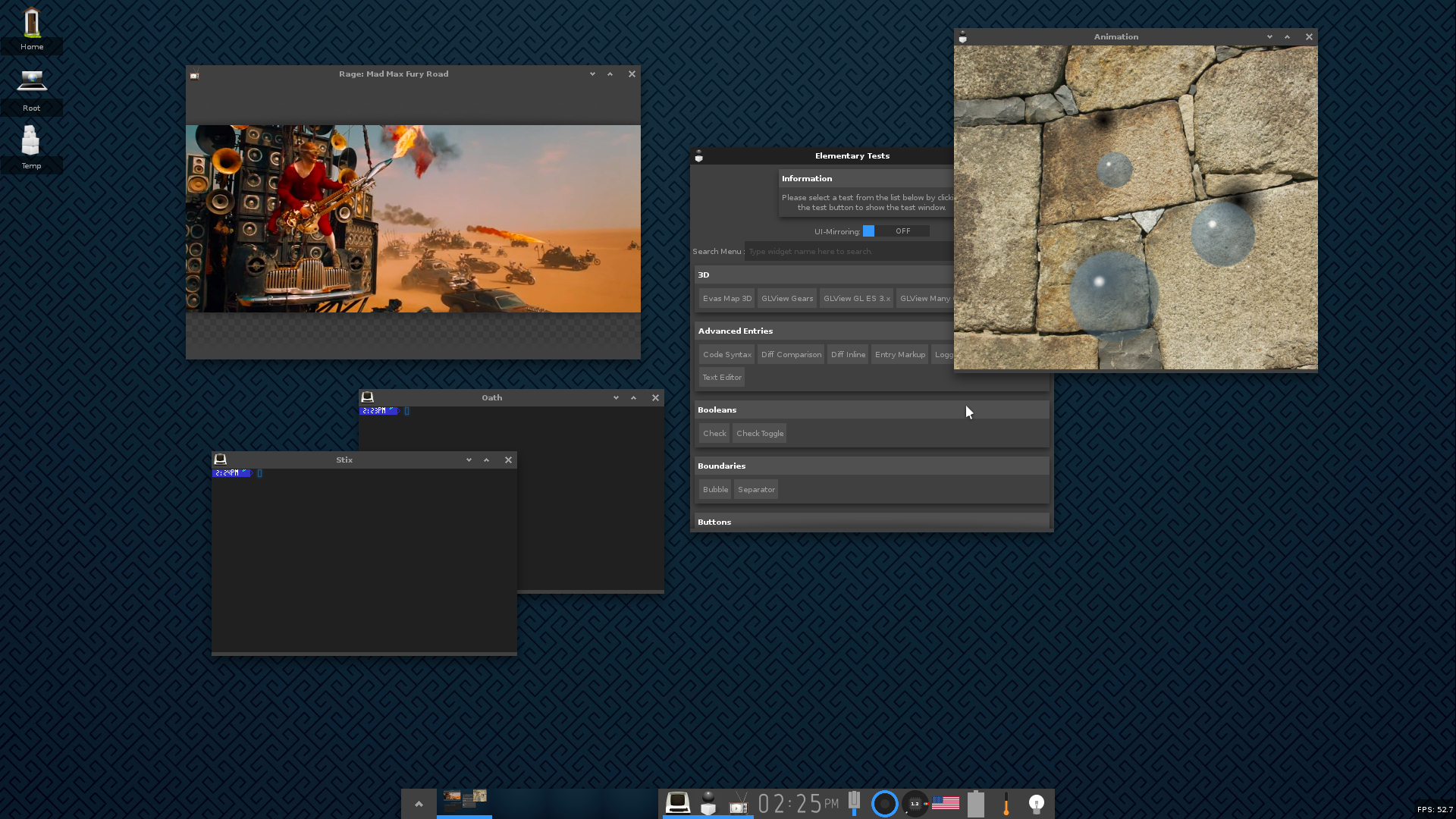
Enlightenment on Raspberry Pi 3 in Wayland mode is pretty smooth
Enlightenment with no X11 (running as a wayland compositor) at a smooth 60fps even with a live miniature pager preview updating to match, a full desktop all smooth at 60fps. Terminology running and Rage playing movies smoothly. On a stock Rasperry Pi 3 running 32bit Arch Linux with Mesa VC4 drivers. See the Arch Linux ARM on Raspberry Pi 3 page for install details.
Don't forget to have the following lines in /boot/config.txt: framebuffer_depth=32 gpu_mem=256 dtoverlay=vc4-kms-v3d You might be OK with 128 or 192 for gpu memory, but I chose to go with 256M as 768M left is plenty for apps and even compiling evrything, while it allocates a reasonable amount of memory for buffers and textures. As I'm running 1920x1080 at 32bpp, it'd be about 24M just for the triple buffered backbuffers for the compositor, and the same for any screen sized client apps plus textures and so on. I haven't overclocked my Pi3 in any way, so it's stock with dynamic clock scaling (the schedutil cpufreq governor). The Pi gets a bit hot and may approach 80 degrees celcisu. Make sure it's well ventilated and not inside a case which allows for no easy heat transfer outside. It may even be a good idea to have a fan on the SoC. This is the nature of such a board as it hasn't got any decent heat trasnfer designed in via large heatsinks or active cooling like a fan. It may also help to know the packages I have installed. The following is a dump of all my packages that are not dependencies via pacman -Qte: sudo pacman -S autoconf \ automake bison ccache \ check connman dri2proto \ dri3proto flex gdb \ gettext glproto \ gst-libav \ gst-plugins-bad \ gst-plugins-good \ gst-plugins-ugly \ htop iputils jfsutils \ licenses \ linux-raspberrypi \ logrotate lvm2 make \ man-db man-pages \ mdadm meson nano \ net-tools netctl ntp \ openssh otf-overpass \ pacman patch pciutils \ perf pkg-config \ presentproto psmisc \ python-mako python2-mako \ raspberrypi-bootloader-x \ raspberrypi-firmware \ reiserfsprogs rsync scim \ smem sudo \ ttf-arphic-ukai \ ttf-arphic-uming \ ttf-baekmuk \ ttf-bitstream-vera \ ttf-cheapskate \ ttf-croscore \ ttf-dejavu \ ttf-droid \ ttf-fira-mono \ ttf-fira-sans \ ttf-freebanglafont \ ttf-freefont \ ttf-gentium \ ttf-hack \ ttf-hanazono \ ttf-hannom \ ttf-inconsolata \ ttf-indic-otf \ ttf-ionicons \ ttf-junicode \ ttf-khmer \ ttf-liberation \ ttf-linux-libertine \ ttf-linux-libertine-g \ ttf-mph-2b-damase \ ttf-roboto \ ttf-sazanami \ ttf-symbola \ ttf-tibetan-machine \ ttf-ubraille \ ttf-ubuntu-font-family \ usbutils valgrind vi \ weston which \ wireless_tools \ wiringpi \ xcb-util-keysyms \ xfsprogs xorg-server \ xorg-server-xwayland \ xorg-xev xorg-xinit \ zsh I compiled EFL, Enlightenment, Terminology and Rage myself from the Enlightenment GIT repositories since I work on them and have my development envirnment set up and transferrable from machine to machine via rsync, but the Arch AUR packages should offer a similar experience. Relevant ones are: | |
Copyright © Carsten Haitzler | raster@rasterman.com | CV/Resumé